
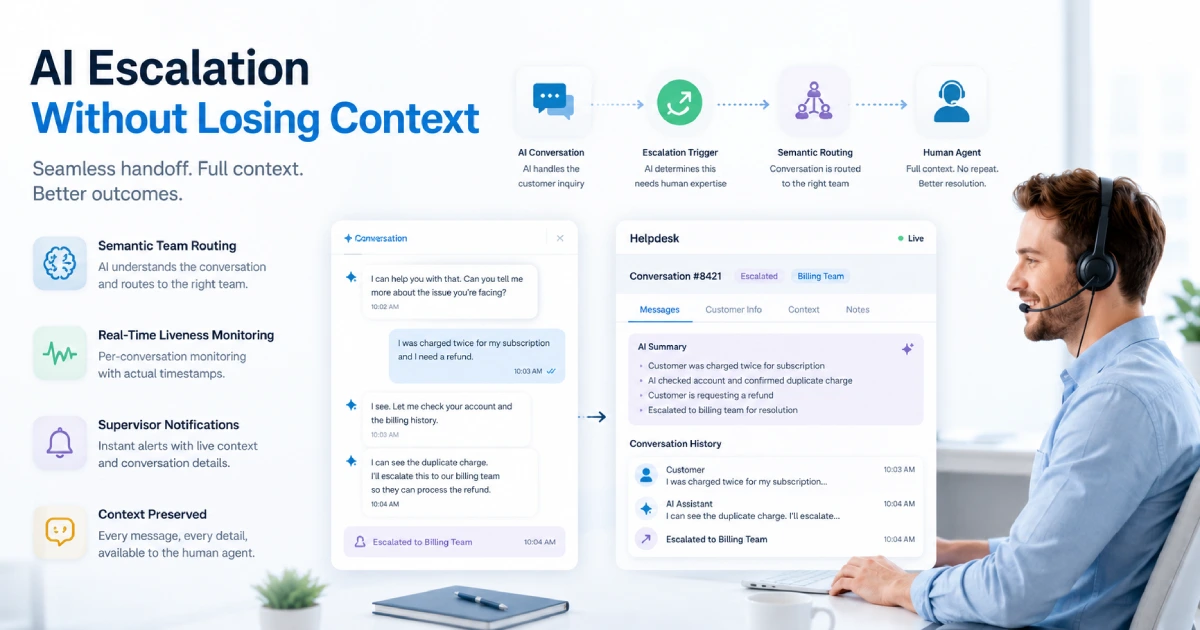
How We Handle AI Escalation Without Losing Context
 Yilak.k· May 22, 2026
Escalation is where most AI support systems fall apart.
The AI handles the conversation well. The customer asks something outside its scope. The conversation gets transferred. And then the human agent opens it and starts from the beginning — "Hi, how can I help you today?" — with no idea what the AI already tried, what the customer already explained, or why the escalation happened at all.
The customer has to repeat themselves. The agent has to reconstruct context. Whatever goodwill the fast AI response created gets spent in the first thirty seconds of the human interaction.
This is not a rare edge case. It is the default behavior of most AI support platforms, because escalation was designed as a routing action — move the ticket from one queue to another — not as a context transfer. The two are fundamentally different things.
TL;DR
- Escalation as a routing action resets context; escalation as a context transfer preserves it — most platforms do the former by default
- Voxe's escalation layer has three distinct components: semantic team routing before any human touches the conversation, real-time per-conversation liveness monitoring, and supervisor notifications with live context embedded
- The routing decision is made by the AI on semantics — a refund dispute goes to billing, an API integration issue goes to technical — not by keyword matching or static rules
- Liveness monitoring tracks agent activity, not just elapsed time — the system distinguishes between an agent who is actively typing and one who has not touched the conversation in thirty minutes, and responds accordingly
- When escalation thresholds are crossed, the supervisor notification arrives inside the helpdesk with the live conversation ID and elapsed time already in the message body — not as an email or Slack alert requiring a context switch
- Three conversation states — active, holding, escalated — allow the system to respond proportionally rather than treating every slow response as an emergency
The Context Problem Escalation Creates
When a customer types into a support chat, they are operating on an assumption: that whoever handles their question already knows what they told the last person. That assumption breaks constantly in support systems with multiple layers.
In a human-only support model, the break happens when conversations are transferred between agents or teams. In an AI-plus-human model, it happens at the AI-to-human handoff — which is ironic, because the AI has actually read every message in the conversation and could pass perfect context to the human agent, if the system was designed to do that.
Most are not. The escalation triggers a queue assignment. The human agent opens the conversation. What they see is the chat transcript, which they now have to read in full to understand what happened. If the AI tried three different approaches before escalating, none of that reasoning is surfaced. If the customer expressed frustration at message seven, the agent has to find that themselves. If the AI identified that this was a billing issue rather than a technical one and routed accordingly, the agent may not know that either.
Context preservation at escalation is not a nice-to-have — it is the thing that determines whether the human half of a hybrid support system works. A human agent who steps into a conversation already oriented can resolve it in a fraction of the time and with a fraction of the customer friction of one who is starting cold.
How Semantic Routing Works Before a Human Sees the Conversation
The first layer of Voxe's escalation architecture handles routing — specifically, getting the conversation to the right team before anyone has to read it.
Most routing systems use keyword matching or static category rules. A conversation containing "refund" goes to billing. A conversation containing "login" goes to technical. These rules work until they don't — when the customer writes "I can't get back into my account after the payment failed" and the keyword logic routes it to technical instead of billing where it belongs.
Voxe's routing uses the AI to read the full conversation semantics and produce a structured routing decision as part of the escalation output. The system evaluates what the conversation is actually about — the underlying problem, not just the words used to describe it — and assigns it to the appropriate team: billing and accounts, technical support, sales, product feedback, or general customer support.
That decision is made before any human touches the conversation. By the time a team member opens it, it is already in the right queue. They are not the first person to have read it — the AI has already processed it, assessed it, and placed it correctly.
The teams themselves are defined per subscription tier and provisioned during account setup, so the routing targets exist in the helpdesk before any workflows go live. The AI is not routing to placeholder categories — it is routing to teams that are configured, staffed, and ready.
The Three-Tier Timing System
The second component addresses a different failure mode: conversations that are correctly routed but go unresponded — either because the assigned agent is unavailable, the team queue is backed up, or the conversation got lost in a busy period.
Standard SLA alert systems work at the ticket level, by polling. Every N minutes, a cron job checks which tickets have exceeded a time threshold and fires a notification. The result is batch alerts: "you have 7 tickets over SLA" — useful for operations review, not useful for catching a specific customer who has been waiting forty minutes.
Voxe's timing system operates differently — and more precisely than raw elapsed time would allow.
The key distinction is what it actually measures. Most SLA systems measure one thing: how long since the last reply. Voxe's monitoring layer measures what the agent is doing. When a conversation is escalated to a human, the helpdesk emits a stream of activity signals in real time: when the agent last opened the conversation, whether they are actively typing, how long the customer has been waiting, when either party was last seen in the session, and a continuously updated record of interaction events within the conversation.
The second AI reads all of that. It is not computing a single "time since last response" number — it is evaluating a picture of agent engagement. An agent who opened the conversation two minutes ago and is currently typing is in a fundamentally different state from an agent who has not touched it in twenty minutes. A threshold breach in the first case is not the same as a threshold breach in the second. The system treats them differently.
This matters because the most common failure mode in SLA alerting is false escalation — notifying a supervisor about a conversation the agent is actively handling. False escalations create noise, erode trust in the alerting system, and over time cause supervisors to filter out the notifications that actually need their attention. A system that can distinguish "agent is composing a response" from "agent has disappeared" produces dramatically fewer false positives.
There are three independently configurable timing thresholds:
Assignee threshold. If a conversation assigned to a specific agent has gone unresponded past a defined window — accounting for agent activity, not just raw idle time — the conversation state moves to "holding." This handles the case where an individual agent has genuinely gone offline or stepped away without reassigning their queue.
Team threshold. The same logic applied at the team level. If a team-assigned conversation has exceeded the team response threshold with no active engagement detected from any team member, it moves to holding. This catches queue backup rather than individual agent absence.
Escalation threshold. When a conversation crosses the escalation threshold with no agent engagement detected — not just no reply, but no activity — the system triggers a supervisor notification. This is not a dashboard badge or an email digest. It is a real message delivered inside the helpdesk, directed at the named supervisor, with the live conversation ID and elapsed wait time interpolated directly in the message body.
The three-state model — active, holding, escalated — allows the system to respond proportionally. Not every slow response is an emergency. A conversation that is two minutes past the assignee threshold with an agent visibly engaged is very different from a conversation that is thirty minutes past the escalation threshold with no activity from anyone on the team.
What the Supervisor Notification Actually Contains
This component is worth explaining in detail because it works differently from most alerting systems.
When the escalation threshold is crossed, the supervisor notification is delivered as a mention inside the live helpdesk conversation — not as a separate email, not as a Slack message, not as a dashboard item that requires navigating to a different tool. The supervisor receives a message in the context of the conversation itself, with a direct reference to the conversation ID and the elapsed time already computed and written into the message.
The practical effect is that the supervisor's first interaction with the escalated conversation is already contextualized. They are not receiving "escalation threshold exceeded — check dashboard." They are receiving a notification that tells them which conversation, how long the customer has been waiting, and links directly to it. One click from the notification to the conversation, with no context reconstruction required.
This matters in high-volume support environments where supervisors are managing multiple teams and multiple queues simultaneously. An alert that requires three navigation steps to act on will be acted on more slowly than one that requires one. At scale, the difference in response time is meaningful.
Accounts can also include a custom escalation message — additional context specific to their workflow or team structure — that gets appended to the notification alongside the live conversation data. A support team that wants to include internal triage notes, escalation procedures, or contact instructions for the supervisor can write those once and have them delivered automatically with every escalation notification.
The notification format uses the helpdesk's native mention system, so it appears in the supervisor's regular interface without requiring any additional tooling or integrations. It is a real message from the platform to a real user, using the platform's existing notification infrastructure.
What This Looks Like From the Customer's Perspective
None of the above is visible to customers. What they experience is different:
They describe their problem once. If the AI resolves it, the conversation ends. If it does not, the conversation is handed to a human team member who already knows what happened — the problem described, the AI's response, why the handoff occurred. The customer does not repeat themselves.
If the human team member is delayed, the customer does not receive silence. The system is monitoring that conversation specifically, not as part of a batch. When the threshold is crossed, a human with authority to act is notified directly. The customer's wait is not invisible.
If the conversation requires a specialist — a billing dispute rather than a technical question — it arrives in the right queue without the customer having to explain which department they need. The AI made that determination based on what was actually said.
The AI and human hybrid model only works as advertised if the handoff between the two layers is clean. A hybrid system where AI handles 70% of conversations is excellent performance. A hybrid system where the 30% that escalates creates a worse experience than a human-only system would — slower, less contextual, more frustrating — is not net positive. The escalation architecture is the thing that determines which of those two outcomes you get.
Why This Architecture Is Unusual
Most support platforms treat escalation as a routing event. The ticket moves. The timer resets. A human picks it up when they get to it.
Treating escalation as a context transfer — where information flows with the conversation, where the human agent steps in already oriented, where liveness is monitored not polled, and where supervisor notification is embedded in the conversation rather than separated from it — requires a different architecture from the ground up.
The per-conversation real-time monitoring, in particular, is computationally different from polling-based SLA systems. Polling is cheap and stateless: run a query, find overdue tickets, fire alerts, done. Per-conversation liveness monitoring requires the system to reason about each open conversation's timestamp data continuously. The computational cost is higher. The result is more precise — the system knows about a specific conversation being in distress, not just that some set of tickets is past threshold.
The tradeoff is worth it, particularly for businesses where support quality is a direct input to retention. The full cost of support operations includes not just agent time but the customer friction created by poor handoffs — repeat explanations, context loss, slow escalation resolution. The architecture that minimizes that friction pays for itself in customer outcomes that do not appear in a support ticket count.
FAQ
What happens to the conversation context when AI escalates to a human?
The full conversation history — every message, in order — is available to the human agent when they open the conversation. The AI does not produce a separate summary handoff note; the conversation itself is the context. Because the semantic routing decision has already been made, the agent who receives the conversation is the right person to handle it, and they step into it with the complete history in front of them.
Can the timing thresholds be configured per account?
Yes. The assignee threshold, team threshold, and escalation threshold are independently configurable. A team with aggressive SLAs can set tight thresholds. A team with a more considered response model can set wider ones. The thresholds are set at the account level and apply across the live workflows without requiring a redeployment.
What is the difference between "holding" and "escalated" conversation states?
Holding indicates that a conversation has exceeded the assignee or team response threshold with no detected agent engagement, and is flagged for follow-up, but has not yet triggered a supervisor notification. It is an intermediate state — the system has identified a genuine lapse in attention, not just a slow response, but has not yet determined it requires supervisor intervention. Escalated means the escalation threshold has been crossed with no activity from any agent, and a supervisor has been notified directly inside the helpdesk.
Does the AI route based on keywords or on conversation meaning?
On meaning. The routing decision is made by analyzing the full conversation semantics — what the customer is actually describing, not which words appear in the message. A refund request described as "I need to get my money back because the product didn't work" routes to billing regardless of whether the word "refund" appears. The AI evaluates the underlying problem, not the surface vocabulary.
How does the supervisor notification avoid alert fatigue?
The three-tier threshold design means supervisors only receive notifications when conversations have genuinely crossed the escalation level — not the first time a response is slow. The intermediate holding state absorbs the minor delays that would otherwise generate constant noise. Supervisors receive fewer, higher-signal notifications as a result.
The escalation problem is structural, not cosmetic. Building a system where AI handles the majority of conversations while humans handle the rest requires more than a "transfer to agent" button. It requires that every component of the handoff — context, routing, liveness, supervisor visibility — was designed as a transfer of state rather than a handoff of a queue item.
That is the difference between a hybrid support model that delivers the promised efficiency, and one that delivers AI performance metrics alongside degraded human support quality for the cases that matter most.
The infrastructure framing for AI support applies here directly: the escalation layer is not a feature. It is the part of the operational architecture that determines whether the whole system functions as promised.