
AI Customer Support: What Actually Works (And What Doesn't)
 yilak.k· April 7, 2026
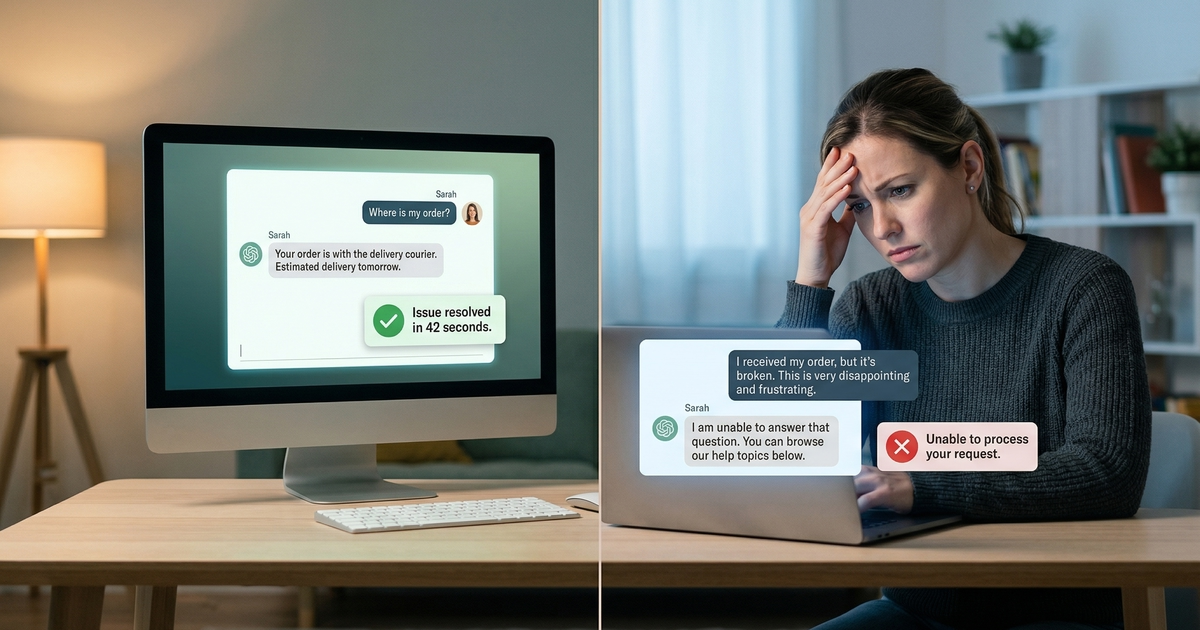
AI customer support gets covered in two modes: breathless enthusiasm from vendors, and equally breathless outrage from customers who got trapped in a chatbot loop. Neither is useful. The honest picture sits between them — and it's more actionable than either extreme. AI handles a specific, definable class of support problems extremely well. It handles another class badly. The difference has almost nothing to do with which AI product you buy. It has everything to do with whether you've matched the tool to the right problem type.
TL;DR
- 72% of customers want immediate service, per Zendesk's 2024 CX Trends Report — AI delivers this reliably for bounded, predictable queries.
- 78% of customers judge service quality by response speed alone, not just resolution quality, per Salesforce State of Service 2024.
- 64% of customers who received an incorrect AI response reported lower trust in the company than before contacting support, per Gartner 2024.
- 59% of customers said they would walk away after several bad AI experiences, per PwC's 2023 Consumer Intelligence Series.
- The deciding factor between AI success and failure is problem type, not technology quality — bounded problems resolve well, judgment-dependent problems do not.
What AI Customer Support Actually Does Well
AI excels at problems with a finite solution space. When the correct answer exists in your documentation, the interaction follows a predictable pattern, and no discretion is required, AI consistently outperforms human agents on speed, availability, and consistency. Five categories hit this profile reliably.
High-Volume, Low-Variability Queries
Password resets, order status checks, return policy questions, account FAQs — these are bounded problems with known answers. The customer's question maps to a documented response. AI handles them faster than any human and at any hour. Per Zendesk's 2024 CX Trends Report, 72% of customers want immediate service — and for this class of query, AI delivers it. These are the same Tier 1 tickets that overwhelm human queues when not intercepted early.
First-Response and Triage
AI can acknowledge, classify, and route a ticket in seconds. Full resolution isn't required for this to add measurable value. Per Salesforce State of Service 2024, 78% of customers judge service quality by response speed, not just resolution. An AI that confirms receipt, identifies the issue type, and routes accurately cuts perceived wait time dramatically — even when a human handles the actual resolution. First-response time is a CSAT lever entirely separate from resolution quality.
After-Hours Coverage
Human agents cost money around the clock. AI costs the same at 3am as at 3pm. For any business with customers in multiple time zones, this is not a convenience feature — it's a structural cost advantage. After-hours volume that previously generated callbacks, delayed responses, and next-day backlogs can be resolved in real time. The unit economics are straightforward: zero marginal cost for the additional coverage window. That advantage compounds when measured against the full cost of running customer support, which typically runs 40–60% above what teams budget.
Consistent Policy Application
Humans apply policies inconsistently. Research from Harvard Business Review has documented that agent decisions on identical cases vary significantly based on fatigue, mood, and recent case history — none of which should affect a customer's outcome. AI applies return policies, refund eligibility rules, and SLA commitments the same way on every ticket. For high-volume policy interactions, consistency reduces disputes, appeals, and the perception of unfairness that drives customers to escalate.
Scale During Volume Peaks
Black Friday, product launches, service outages — these events create ticket spikes that overwhelm human teams regardless of staffing levels. AI absorbs the spike without queue buildup. E-commerce teams that have used AI to handle peak-season volume report flat CSAT scores during periods that previously produced their worst customer experience metrics. The value isn't just cost — it's that human agents remain available for the complex tickets that actually require them during the highest-stress moments.
Where AI Customer Support Fails
AI fails at problems that require judgment, discretion, access to unstated context, or genuine emotional intelligence. These failures are not bugs to be patched. They are structural limitations of the technology's current design. Teams that treat them as temporary will keep making the same expensive mistakes.
Ambiguous or Novel Queries
If the answer isn't in the knowledge base, AI guesses. It does so confidently, which is worse than guessing tentatively. Per Gartner 2024, 64% of customers who received an incorrect AI response reported lower trust in the company than before they contacted support. That's not a neutral outcome — it's a net-negative interaction that erodes brand credibility. The knowledge base is the hard ceiling on AI accuracy. Investing in knowledge base quality is not optional infrastructure; it is the primary determinant of whether your AI performs or damages customer relationships.
High-Emotion Situations
A customer who received a broken product the day before an important event does not need a FAQ lookup. They need acknowledgment before information. The sequence matters: recognize the frustration, then address the problem. AI can pattern-match to empathetic phrases, but it cannot exercise discretion — a human agent can choose to go beyond policy when the situation warrants it. AI cannot. For interactions where the emotional state is the actual presenting problem, scripted empathy performs poorly against genuine human judgment.
Complaint Escalation
When a customer contacts support already frustrated — because a previous interaction failed, because the same problem has recurred, because they feel ignored — an AI response that feels scripted reads as indifference. It confirms the customer's suspicion that the company doesn't care. Per PwC's 2023 Consumer Intelligence Series, 59% of customers said they would walk away from a company after several bad AI experiences. In escalation scenarios, AI engagement often accelerates churn rather than preventing it.
Complex Multi-Step Problems
"I was charged twice, my account shows the wrong plan, and I never received my confirmation email" — this requires cross-system access, sequential reasoning, and judgment about which problem to resolve first. Current AI handles individual steps adequately. It struggles with the full chain: recognizing dependencies between issues, sequencing actions correctly, and confirming that each resolution didn't create a downstream problem. Multi-step diagnostic reasoning remains a weak point, and the failure mode — partial resolution with misplaced confidence — frustrates customers more than a clean handoff to a human would have.
Brand-Sensitive Situations
A high-value customer threatening to cancel, a public complaint gaining traction on social media, a media contact asking about a service failure — these situations require immediate human involvement. The cost of a wrong AI response in these cases far exceeds any marginal savings from automation. No amount of routing sophistication replaces the judgment to recognize when the stakes of the interaction demand a human. AI should exit these conversations as fast as possible, not attempt resolution.
The Deciding Factor: Problem Type, Not Technology
The pattern across all five successes and all five failures is consistent: AI works when the problem space is bounded and the answer exists in your documentation. It fails when the problem requires judgment, discretion, access to unstated context, or genuine emotional intelligence. This is not a criticism of any specific AI product. It is a structural description of what the technology currently is and isn't.
Teams that get real ROI from AI support don't have better AI. They have better problem classification. They've audited their ticket types, identified which categories are bounded and which require judgment, and deployed AI only against the bounded set. Teams that waste budget on AI support have typically deployed it against an undifferentiated ticket queue — and then measured aggregate CSAT without separating AI-handled results from human-handled results.
The table below is a working heuristic, not an exhaustive taxonomy. Use it as a starting filter.
| AI handles well | Needs a human |
|---|---|
| Password resets and account access | First contact from a visibly upset customer |
| Order status and shipping updates | Complaints about a previous failed interaction |
| Return and refund policy lookups | Multi-issue problems requiring cross-system work |
| Plan or pricing FAQs | Situations involving discretionary exceptions |
| After-hours acknowledgment and triage | High-value customer retention conversations |
| Volume spikes on known query types | Public-facing or media-sensitive complaints |
How to Design AI Support That Knows Its Limits
The practical implementation question is not "how do we get AI to handle more?" It's "how do we design a system that gets out of its own way when it reaches its limits?" The hybrid model that makes AI and human support work together depends on four design principles.
Set explicit confidence thresholds, then honor them. AI systems can be configured to escalate when confidence in a response falls below a defined threshold — typically 80–85%. Most teams configure this setting and then don't audit whether it's working. Check monthly: what percentage of escalated tickets were escalated at the right moment? What percentage of AI-resolved tickets contain errors? The threshold is a dial, not a setting you configure once and forget.
Design handoffs to carry full context. A customer who explained their issue to an AI should not repeat it to a human. Every escalation should include a structured summary: what the customer reported, what the AI attempted, what the system flagged as the probable issue type. Cold handoffs — where the human agent starts from scratch — undo the goodwill of the AI interaction and add to handle time. Context portability is not a nice-to-have; it's the mechanism that makes the hybrid model feel coherent to the customer.
Train AI to recognize emotional signals as routing triggers. Language patterns indicating frustration, urgency, or distress — "I've already tried this," "this is unacceptable," "I need to speak to a manager" — should trigger immediate escalation rather than continued AI engagement. The AI's job in these moments is not to calm the customer. It's to get a human into the conversation as fast as possible.
Audit AI failures, not just AI successes. Most teams track deflection rate and CSAT for AI-handled tickets. Fewer track the rate at which AI interactions preceded a human escalation — which is a direct measure of AI failure. Tracking failure modes by ticket category lets you identify which problem types are still misrouted to AI and refine your classification rules accordingly. Improvement compounds when failure data drives the feedback loop.
FAQ
Is AI customer support good or bad?
Neither, in the abstract. AI customer support performs well for bounded, repetitive, low-judgment queries — password resets, order status, policy FAQs — and performs badly for emotional, ambiguous, or high-stakes interactions. The technology is not the variable. Problem-type matching is. Teams that classify before they deploy get strong ROI. Teams that deploy against undifferentiated queues get frustrated customers.
What percentage of support tickets can AI handle?
Most support teams can automate 50–70% of ticket volume with a well-built knowledge base and accurate routing. Gartner 2024 projects the ceiling at 80% of customer interactions without human involvement by 2027. Practically, start at 40–50% to maintain accuracy, and expand only as confidence scores and post-resolution surveys validate quality. Automating more at lower accuracy costs more in trust erosion than it saves in agent time.
When should AI escalate to a human agent?
Escalation triggers should be explicit, not left to inference. Hard triggers: customer has used language indicating frustration or distress, the AI confidence score has fallen below threshold, the query involves multiple linked issues, the customer has contacted support more than twice about the same problem. Soft triggers: the ticket category matches a defined high-sensitivity type (retention risk, media-related, high account value). Every AI deployment should have these documented before go-live.
How do you measure if your AI customer support is working?
Track four metrics separately for AI-handled tickets: resolution rate (did the ticket close without human follow-up?), post-resolution CSAT (how did customers rate the interaction?), escalation-preceded rate (how often did AI engagement precede a human escalation?), and error rate (what percentage of AI responses contained incorrect information?). Aggregate deflection rate is a vanity metric — it counts tickets closed, not problems solved. Accuracy and CSAT by ticket category tell you whether the right problems are being automated.
What's the biggest mistake companies make with AI support?
Deploying against undifferentiated queues without classifying ticket types first. The second-biggest mistake is treating confidence thresholds as a set-and-forget configuration rather than an ongoing calibration. Per Gartner 2024, companies that received the worst customer outcomes from AI support shared one common characteristic: they measured deflection volume without measuring deflection accuracy. Moving tickets out of the human queue is easy. Moving the right tickets is the entire job.